
 Basin for Craft docs
Error log
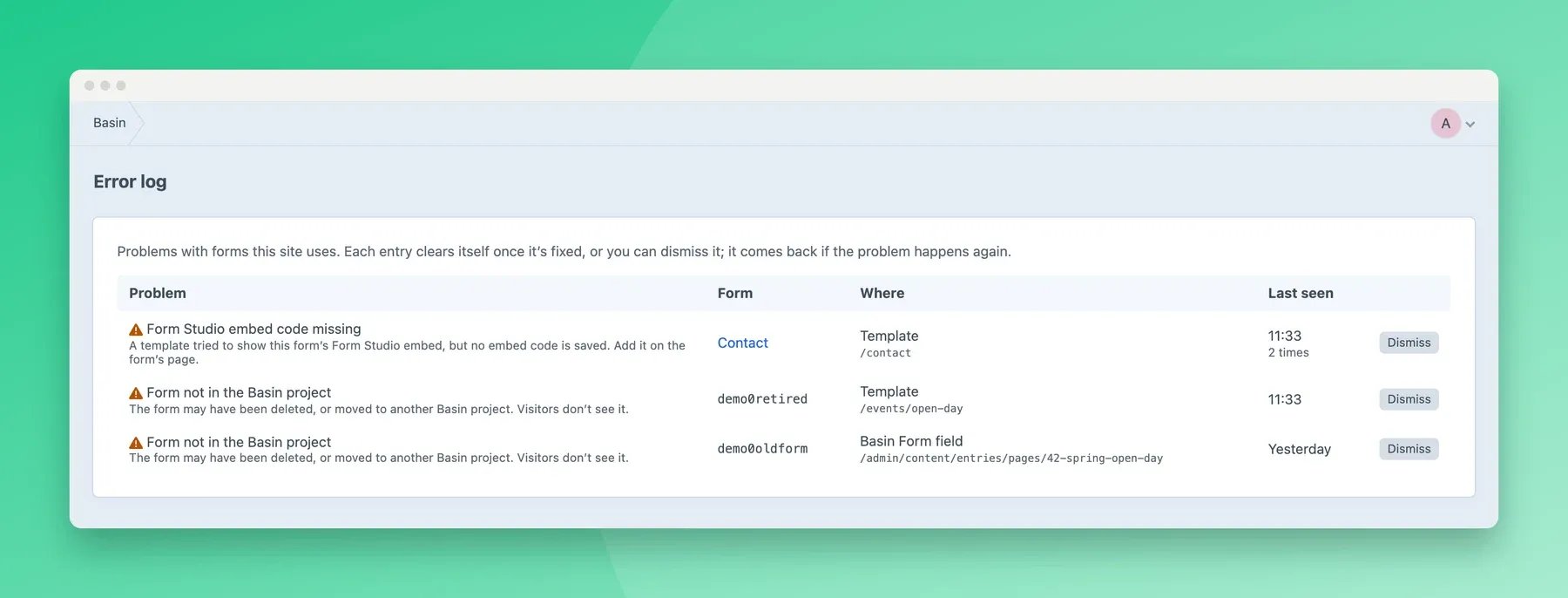
Basin → Error log lists problems with the Basin forms your site uses, so you can fix them before visitors notice. A badge on the menu item shows how many there are.
| Problem | What it means | How to fix it |
|---|---|---|
| Form not in the Basin project | A template, Basin Form field, GraphQL query or form on a page uses a form that isn’t in the linked project. Visitors don’t see it, or can’t submit it. | Move the form back to the linked project in Basin, or update the template or field. See Missing or moved forms. |
| Form Studio embed code missing | A template tried to show a form’s Form Studio version, but no embed code is saved. | Add the embed code on the form’s page. |
| Form Studio embed code no longer works | Basin no longer recognises the saved embed code, for example because the Form Studio version was deleted. | Paste the current embed code on the form’s page. |
Each entry shows the form, where it was used (the page’s path, without any query string), when it last happened, and how many times.
An entry clears itself when the plugin can see the problem is fixed: the form is back in the linked project, or its embed code is saved or replaced. This happens when you open the error log.
If you fixed it on your side instead, for example by removing the form from a template or changing a Basin Form field, the plugin can’t tell. The entry clears itself after 30 days without happening again, or you can Dismiss it straight away. Either way, it comes back if the problem happens again.
The log holds no personal data. To turn it off, turn off Track missing forms in the settings.